Download Narrator for Mac → · See the code on GitHub ↗
01The problem
A lot of what I read now is on a screen: long Claude replies, docs, articles, notes. Some days there is no energy left to read all of it, and I would rather listen. The Mac's built-in screen reader sounds robotic. The voices that sound human live in the cloud, charge by the word, and see everything you send them.
02What I built
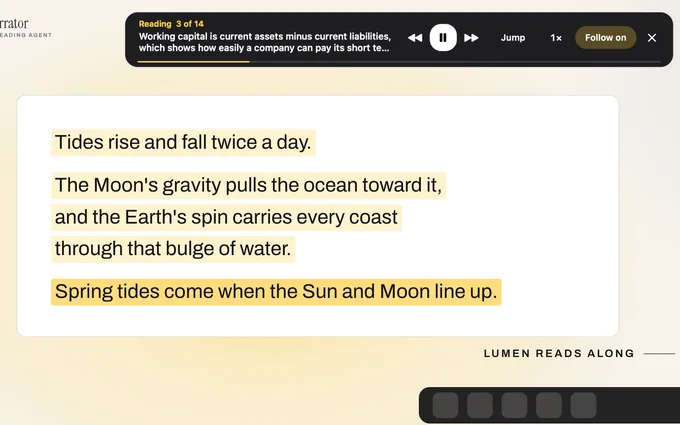
Narrator is a Mac menu bar app. Press Option, Shift, 4, drag over anything, say what it is for, and it reads it aloud, highlighting each line as it goes. The voice is Kokoro, an open speech model that runs on the Mac itself.
- Pick a mood (Calm, Warm, Serious, News, Story) and a voice: a woman or a man, American or British
- Follow mode keeps reading new text as it appears, so a Claude chat is read out as it streams in
- Tables are read row by row, with each value named by its column, so a pricing table sounds like a sentence
- Jump lets you click any sentence and carry on from there
- Ask answers questions about what is on screen, using your own Claude plan. Lumen walks you through connecting Claude, and Narrator only ever uses a Claude plan, never a paid API account
It also has a face. Lumen, a small moth librarian, lives on top of the Dock. It walks over to the app you are reading, its mouth and lantern follow the voice, it cups its antennae when you ask a question, and it falls asleep after a few quiet minutes. Lumen's ten poses were cut out of one generated pose sheet with a small script that uses Apple's Vision framework.
03Results
Free and open source under the GPL. Reading works offline and uses no account, no API key and no tokens. The download carries the voice inside it, so it works on a plane. Version 1.3 cut the download from 915 MB to about 600 MB by leaving out a machine-learning library the voice never used, made the check for new text up to six times faster in long Claude chats, and brought Narrator's idle processor use from about 15% to 2%.