FreeMac app
Narrator reads your screen aloud.
Point at any text on your Mac, a Claude reply, an article, a PDF, and hear it read in a natural voice, with each line highlighted as it goes. The voice runs on your Mac: no account, no API key, and it works offline.
Free and open source · About 600 MB · Apple silicon Macs (M1 or later) on macOS 14 or later

See it
Fifty seconds, in Narrator's own voice.
Install
Four steps, about two minutes.
-
Download Narrator
The file is about 600 MB because the voice is inside it, which is why Narrator works offline.
-
Drag it into Applications
Open the file you downloaded. A window shows Narrator and your Applications folder: drag Narrator onto Applications.
-
Open it the first time
macOS stops apps that don't come from the App Store or a registered Apple developer the first time you open them. Narrator is open source and signed, but not registered with Apple, so you allow it once:
- macOS 15 or later: open Narrator from Applications and click Done on the warning. Then open System Settings, choose Privacy & Security, scroll down, and click Open Anyway next to Narrator. Enter your Mac password if asked.
- macOS 14: right-click Narrator in Applications, choose Open, then click Open again.
You only do this once.
-
Say hello to Lumen
A small moth lands on your Dock and walks you through two permissions, each with a button that opens the right page of System Settings:
- Screen Recording, so Narrator can see the text you point at. It only looks at the area you select. After switching it on, click Reopen Narrator.
- Accessibility, so it can hear its shortcuts and scroll pages as it reads.
Read
Point, pick, listen.
- Press Option Shift 4 and drag over any text. Or click Lumen.
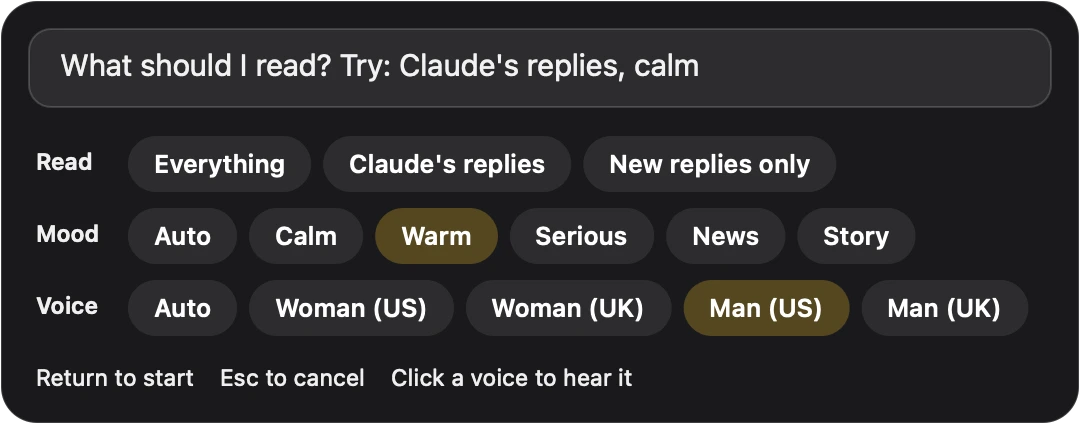
- Say what to read, like "Claude's replies", and pick a mood and a voice. Click a voice to hear it.
- Press Return. Narrator reads line by line, highlights each one, and scrolls on by itself.
Click any sentence to jump there. Follow mode keeps reading new replies as a Claude chat streams in, and tables are read row by row.

Optional
Connect Claude to ask about your screen.
Reading needs nothing more. Two extras use Claude Code with your own Claude plan, at no extra cost: asking questions about what's on screen with Option Shift A, and a richer reading voice.
-
Choose Connect Claude
Click Narrator's icon in the menu bar and choose Connect Claude…, or press Option Shift A. Lumen checks your setup and tells you the next step.
-
Install Claude Code if needed
If you use the Claude desktop app, Narrator may find its copy of Claude Code already. Otherwise follow Anthropic's install guide, then click Check again.
-
Sign in
Click Sign in. Claude's own sign-in opens in your browser, and Narrator connects by itself once you're done. The menu then says Claude connected.
Narrator only uses a Claude plan. If Claude Code is signed in with an API account, which bills per use, Narrator asks you to sign in with your Claude account instead.
Private
Reading stays on your Mac.
- On-device voice. Narrator reads text with macOS's own text recognition and speaks it with Kokoro, an open voice model inside the app. Nothing is uploaded.
- No account, no tracking. There is nothing to sign up for, and the app has no analytics.
- Claude only when you ask. Ask and the richer voice send text to Claude through your own Claude Code, only when you use them.
Questions
Good to know.
Is it really free?
Yes. Narrator is free and open source under the GPL. The code is on GitHub.
Does it work on an Intel Mac?
No. The voice runs on Apple silicon, so Narrator needs an M1 Mac or later, on macOS 14 or later.
Why does macOS say it can't check the developer?
Narrator is signed, but not registered with Apple's paid developer program, so macOS asks you to allow it once. The steps are in Install, step 3.
Narrator doesn't read anything. What do I check?
Open System Settings, then Privacy & Security, then Screen Recording, and make sure Narrator is switched on. Quit Narrator from its menu bar icon and open it again, since macOS only applies this permission after a restart of the app.
Asking a question doesn't work.
Choose Connect Claude… from Narrator's menu. Lumen tells you whether Claude Code needs installing or signing in. If you've reached your Claude usage limit, Narrator says so, and asking works again when the limit resets.
How do I remove it?
Quit Narrator from its menu bar icon and drag it from Applications to the Trash. The GitHub page lists the few small files it leaves, if you want them gone too.