01The problem
A lot of what I read now is on a screen: long Claude replies, docs, articles, notes. Some days there is no energy left to read all of it, and I would rather listen. The Mac's built-in screen reader sounds robotic. The voices that sound human live in the cloud, charge by the word, and see everything you send them.
02What I built
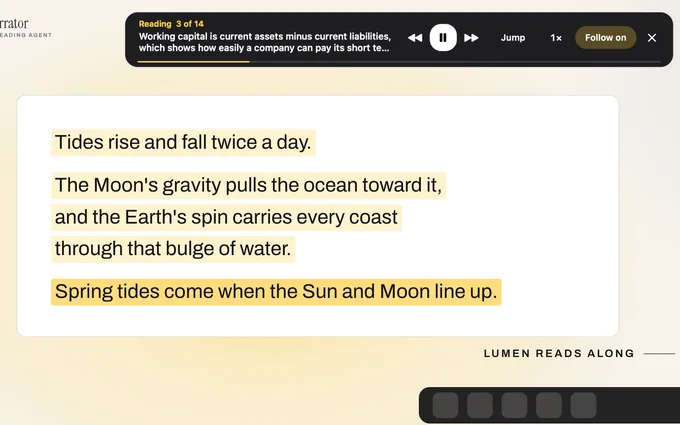
Lumen is a Mac menu bar app. Press Option, Shift, 4, drag over anything, say what it is for, and it reads it aloud, highlighting each line as it goes. The voice is Kokoro, an open speech model that runs on the Mac itself.
- Pick a mood (Calm, Warm, Serious, News, Story) and a voice: a woman or a man, American or British
- Follow mode keeps reading new text as it appears, so a Claude chat is read out as it streams in
- Tables are read row by row, with each value named by its column, so a pricing table sounds like a sentence
- Jump lets you click any sentence and carry on from there
- Ask answers questions about what is on screen, using your own Claude plan. Lumen walks you through connecting Claude, and it only ever uses a Claude plan, never a paid API account
- Note for Claude, added in version 1.4, lets you mark parts of any document, write a thought on each, and paste them all into a Claude chat at once. A PDF on the Mac goes to Claude as a marked-up copy with the notes highlighted where they belong; anything else becomes one notes PDF. The notes live inside the file because Claude Code's composer drops pasted text when files come along. History keeps every set for 30 days
It also has a face. Lumen, a small moth librarian, lives on top of the Dock. It walks over to the app you are reading, its mouth and lantern follow the voice, it cups its antennae when you ask a question, and it falls asleep after a few quiet minutes. Lumen's ten poses were cut out of one generated pose sheet with a small script that uses Apple's Vision framework.
03From Narrator to Lumen
The app launched as Narrator, but its face was already Lumen, the moth. "Narrator" is also the name of Windows' built-in screen reader, so searching for it led to Microsoft's pages. Version 1.3.2 renamed the app after its moth: Lumen, a unit of light, for a character who reads by lantern. The new icon shows Lumen reading a highlighted line, which is what the app does, and the wordmark turns the m into the moth. The app kept its internal ID, so people who updated kept their settings.
04Results
Free and open source under the GPL. Reading works offline and uses no account, no API key and no tokens. The download carries the voice inside it, so it works on a plane. Version 1.3 cut the download from 915 MB to about 600 MB by leaving out a machine-learning library the voice never used, made the check for new text up to six times faster in long Claude chats, and brought idle processor use from about 15% to 2%.