 Free Mac app
Lumen reads your screen aloud.
Your reading buddy for Mac. Point it at any text, a long Claude thread, a case study, a report, and hear it read in a natural voice with each line highlighted, so more of it sticks. The voice runs on your Mac: no account, no API key, and it works offline.
Free and open source · About 600 MB · Apple silicon Macs (M1 or later) on macOS 14 or later
How it works
Point, pick, listen.
-
Point
Press Option Shift 4 and drag over any text, or click Lumen on your Dock.
-
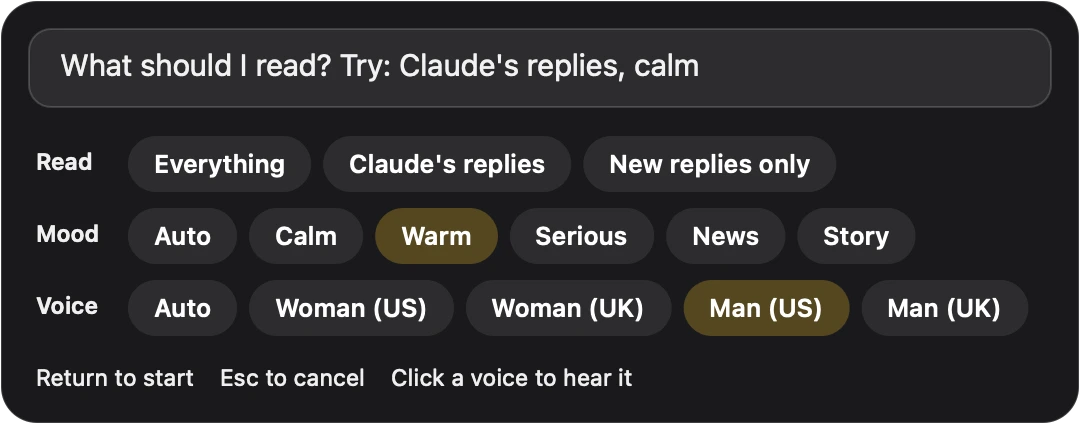
Pick
Say what to read, like "Claude's replies", then pick a mood and a voice. Click a voice to hear it.
-

Listen
Press Return. Lumen reads line by line, highlights each one, and scrolls on by itself.
- Follow mode keeps reading new replies as a Claude chat streams in.
- Tables are read row by row, each value named by its column.
- Jump: click any sentence to carry on from there.
- Ask about what's on screen with Option Shift A, using your own Claude plan.
New in 1.4
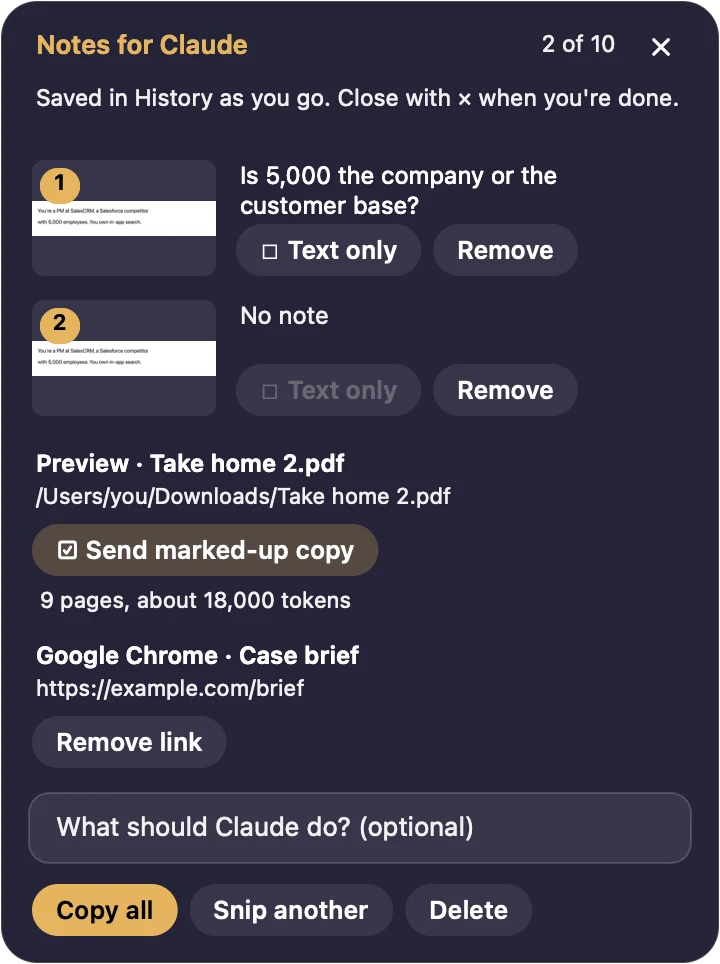
Notes for Claude, in one paste.
- Click Lumen and choose Note for Claude, or choose it from the menu bar.
- Drag over a part of any document and type or dictate your thought on it. Repeat as you scroll, up to 10 parts.
- Click Copy all and paste into any Claude chat or project.
For a PDF on your Mac, Claude gets a marked-up copy with your notes highlighted where they belong. For anything else, it gets one PDF with each part's text, a picture of it and your note, plus the original file when it's a document on your Mac. History keeps your sets for 30 days so you can copy them again. It works without connecting Claude: it only uses your clipboard.
Private
Reading stays on your Mac.
- On-device voice. Lumen reads text with macOS's own text recognition and speaks it with Kokoro, an open voice model inside the app. Nothing is uploaded.
- No account, no tracking. There is nothing to sign up for, and the app has no analytics.
- Claude only when you ask. Ask and the richer voice send text to Claude through your own Claude Code, only when you use them.
- Notes go only to your clipboard. Note for Claude sends nothing itself. It saves its file in your Downloads folder and puts it on your clipboard for you to paste.
Install
Four steps, about two minutes.
-
Download Lumen
Had Narrator? Quit it, install Lumen, then drag Narrator from Applications to the Trash. Lumen keeps your settings. The file is about 600 MB because the voice is inside it, which is why Lumen works offline.
-
Drag it into Applications
Open the file you downloaded. A window shows Lumen and your Applications folder: drag Lumen onto Applications.
-
Open it the first time
macOS stops apps that don't come from the App Store or a registered Apple developer the first time you open them. Lumen is open source and signed, but not registered with Apple, so you allow it once:
- macOS 15 or later: open Lumen from Applications and click Done on the warning. Then open System Settings, choose Privacy & Security, scroll down, and click Open Anyway next to Lumen. Enter your Mac password if asked.
- macOS 14: right-click Lumen in Applications, choose Open, then click Open again.
You only do this once.
-
Say hello to Lumen
A small moth lands on your Dock and walks you through two permissions, each with a button that opens the right page of System Settings:
- Screen Recording, so Lumen can see the text you point at. It only looks at the area you select. After switching it on, click Reopen Lumen.
- Accessibility, so it can hear its shortcuts and scroll pages as it reads.
Optional
Connect Claude to ask about your screen.
Reading needs nothing more. Two extras use Claude Code with your own Claude plan, at no extra cost: asking questions about what's on screen with Option Shift A, and a richer reading voice.
-
Choose Connect Claude
Click Lumen's icon in the menu bar and choose Connect Claude…, or press Option Shift A. Lumen checks your setup and tells you the next step.
-
Install Claude Code if needed
If you use the Claude desktop app, Lumen may find its copy of Claude Code already. Otherwise follow Anthropic's install guide, then click Check again.
-
Sign in
Click Sign in. Claude's own sign-in opens in your browser, and Lumen connects by itself once you're done. The menu then says Claude connected.
Lumen only uses a Claude plan. If Claude Code is signed in with an API account, which bills per use, Lumen asks you to sign in with your Claude account instead.
Questions
Good to know.
Wasn't this called Narrator?
Yes, until November 2026. Same app, new name: "Narrator" is also Windows' screen reader, so Lumen is named after its moth. If you had Narrator, install Lumen and it keeps your settings.
Is it really free?
Yes. Lumen is free and open source under the GPL. The code is on GitHub.
Does it work on an Intel Mac?
No. The voice runs on Apple silicon, so Lumen needs an M1 Mac or later, on macOS 14 or later.
Why does macOS say it can't check the developer?
Lumen is signed, but not registered with Apple's paid developer program, so macOS asks you to allow it once. The steps are in Install, step 3.
Lumen doesn't read anything. What do I check?
Open System Settings, then Privacy & Security, then Screen Recording, and make sure Lumen is switched on. Quit Lumen from its menu bar icon and open it again, since macOS only applies this permission after a restart of the app.
Asking a question doesn't work.
Choose Connect Claude… from Lumen's menu. Lumen tells you whether Claude Code needs installing or signing in. If you've reached your Claude usage limit, Lumen says so, and asking works again when the limit resets.
How do I remove it?
Quit Lumen from its menu bar icon and drag it from Applications to the Trash. The GitHub page lists the few small files it leaves, if you want them gone too.